
In 2026, the infrastructure exists, and the models are powerful. AWS alone plans to invest over $200 billion in capital expenditure this year, driven largely by AI demand. Yet RAND Corporation has cited estimates that more than 80% of AI projects fail to deliver their intended business value – not because models don’t work, but because the systems around them weren’t built for production.
The bottleneck isn’t AI capability. It’s the gap between a working model and a scalable system. Closing that gap requires architecture decisions around deployment, observability, cost control, security, and team ownership – decisions that define whether an AI development partner can actually deliver production results.
Quick Answer
How do you build scalable AI systems on AWS? Treat AI as a system, not a model. This means designing cloud-native architecture with decoupled training and inference, building MLOps pipelines for automated deployment and monitoring, implementing cost observability per feature, and adding security and data governance from the start. Companies that invest in infrastructure foundations first are better positioned to control costs, reduce deployment risk, and turn AI pilots into production systems.
Production AI on AWS requires five foundations working together: scalable infrastructure + automated MLOps + system-level observability + security-by-design + cost governance. If one layer is missing, the system may still work in a demo – but it will struggle in production.
Why AI Systems Fail at Scale – And Why It’s Not About the Model
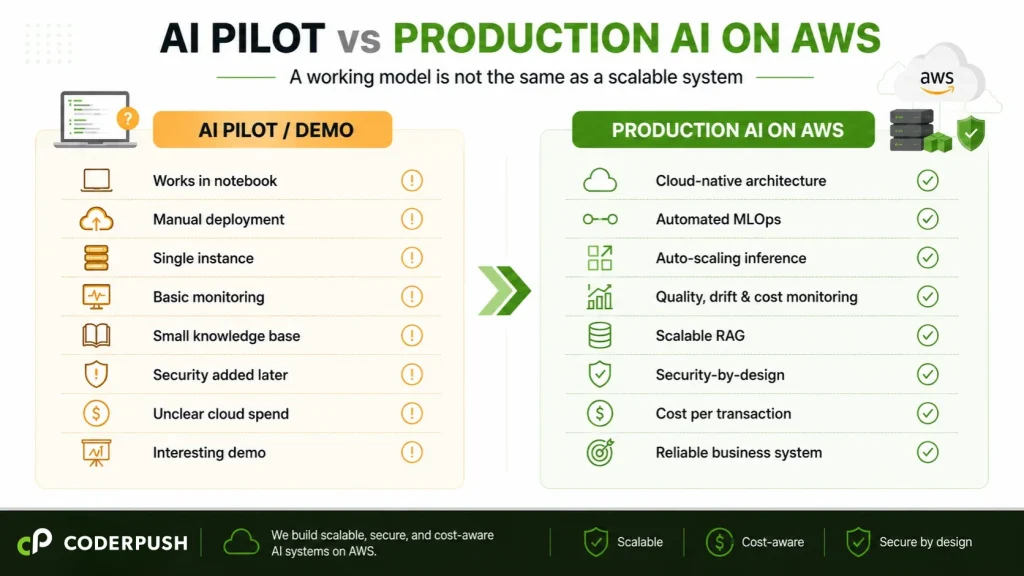
AWS provides the building blocks: SageMaker, Bedrock, Lambda, OpenSearch, and Step Functions. But building blocks without architecture are just a pile of expensive services.
Here’s where most teams go wrong:
They mistake model accuracy for system readiness. A model with 95% accuracy in testing can still fail in production if it has no monitoring, no fallback logic, no cost controls, and no data drift detection. Production AI is a system problem, not a model problem.
They underestimate the cost. AI and ML workloads can represent a significant share of cloud spend, especially once models move from experimentation to production. Inference traffic, vector databases, storage, monitoring, and retraining pipelines all introduce cost patterns that are harder to forecast than traditional cloud workloads. A Flexera survey of cloud decision-makers has consistently found that organizations waste 27–32% of their cloud spend – a reminder that cost visibility needs to be designed into the architecture from the start.
They skip MLOps. Research and industry reports consistently point to inadequate MLOps practices as a major barrier to moving ML models from experimentation to production. Teams that lack automated deployment, monitoring, and versioning struggle to maintain AI systems once they’re live.
CoderPush POV: The most common pattern we see: a team builds a good model, deploys it on a single EC2 instance, and calls it “production.” No auto-scaling, no monitoring, no cost tagging. When traffic grew, the system either crashed or the bill tripled. Architecture, not model quality, is often the root cause.
Cloud Transformation: The Foundation for Production AI
Most companies don’t fail at AI because they lack access to models. They fail because their cloud environment was never designed for AI workloads.
Production AI requires elastic compute, secure data access, automated pipelines, observability, and cost governance. These aren’t features you add after launch – they’re the infrastructure that makes launch possible. Cloud transformation is not a separate initiative from AI execution. It is often the prerequisite that makes AI execution viable.
If your cloud environment can’t auto-scale inference endpoints, enforce data access boundaries, or track cost per feature, then your AI initiative is building on a foundation that won’t hold.
Not sure whether your AWS environment is ready for production AI? CoderPush can help assess your cloud architecture, MLOps readiness, security posture, and cost visibility before you scale.
Once the cloud foundation is clear, the next step is designing AI as an operational system – not a one-off deployment. On AWS, that means making deliberate architecture decisions across compute, model routing, retrieval, automation, observability, security, and cost governance.
AI Infrastructure on AWS: The Architecture Stack for Production Systems
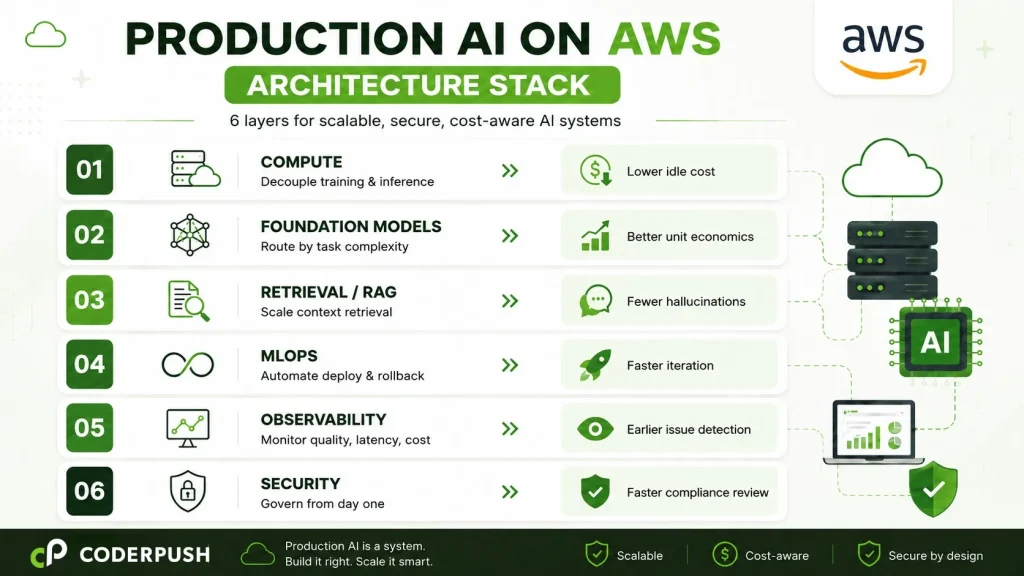
Layer 1 – Compute: Decouple Training From Inference
Training and inference have fundamentally different compute profiles. POC teams often run on the same instance. At scale, this wastes money and limits flexibility.
For training: Use SageMaker Training Jobs with Spot Instances (up to 90% cost savings over On-Demand). For distributed training, SageMaker HyperPod provides managed cluster infrastructure with built-in fault tolerance.
For inference: Deploy on SageMaker Endpoints with auto-scaling policies tied to actual request volume. For bursty workloads, Serverless Inference eliminates idle compute costs entirely – you pay only when requests come in.
Business impact: lower idle compute cost and fewer scaling failures during traffic spikes.
Layer 2 – Foundation Models: Route by Task, Not by Default
AWS Bedrock provides access to multiple foundation models. The architectural mistake most teams make: they pick one model for everything. Whether you’re building a generative AI application or a classification pipeline, model selection should be driven by task requirements – not convenience.
A simple classification task doesn’t need the most powerful model – a lighter model handles it at a fraction of the cost. Build routing logic that selects the model based on task complexity, latency requirements, and cost constraints. This single pattern – intelligent model routing – can reduce inference costs significantly without sacrificing output quality.
Business impact: lower per-request cost with maintained output quality, directly improving unit economics.
Layer 3 – Retrieval: Designing RAG Pipelines That Scale on AWS
RAG is the backbone of most enterprise AI systems. But a pipeline that works at demo scale will break at production scale. Knowledge bases grow, embeddings become stale, and chunk sizes that worked for 100 documents fail at 100,000. This is one of the most common reasons why AI solutions fail after deployment – the retrieval layer wasn’t designed for growth.
AWS services for production RAG: OpenSearch Serverless or Amazon Aurora pgvector for vector storage with auto-scaling, S3 with intelligent tiering for document storage, and SageMaker or Bedrock for embedding generation. Monitor retrieval hit rate as a first-class metric – it tells you whether your AI is finding the right context or hallucinating around gaps.
Business impact: more accurate AI responses, fewer hallucinations, and a better customer experience.
Layer 4 – MLOps on AWS: Automating Deployment, Monitoring, and Rollback
The teams that successfully ship AI in production build deployment, versioning, monitoring, and rollback automation early – not after the model is “done.”
A production MLOps stack on AWS includes:
- SageMaker Pipelines for orchestrated, repeatable workflows
- Model Registry for version control and approval gates
- CloudWatch + custom metrics for inference latency, error rates, token usage, and data drift
- Automated retraining triggers when drift exceeds thresholds
- Lambda + Step Functions for event-driven automation
The principle: no human should need to SSH into a production instance to deploy a model update.
Business impact: faster iteration cycles, lower deployment risk, and fewer production incidents caused by manual errors.
Layer 5 – AI Observability on AWS: Monitor the System, Not Just the Model
Traditional monitoring tracks uptime, latency, and error rates. AI systems require additional layers:
- Output quality – are model responses degrading over time?
- Token usage per request – is the cost per inference stable or drifting?
- Retrieval accuracy – is the RAG pipeline returning relevant documents?
- Guardrail triggers – how often is the system blocking harmful or off-topic outputs?
- User feedback signals – task completion rates, thumbs up/down
Build these into CloudWatch dashboards with automated alerts. When something drifts, the engineering team should know before users notice.
Business impact: faster issue detection, better cost control, and fewer production surprises.
Layer 6 – Secure AI Deployment on AWS: Design for Trust Before Production
Security can’t be an afterthought in production AI systems – especially those that process user data or generate customer-facing outputs.
What production AI security requires on AWS:
- IAM with least privilege – restrict who and what can access models, data, and endpoints
- Encryption at rest and in transit – S3 server-side encryption, TLS for all API calls, KMS for key management
- Data access boundaries – isolate training data, inference inputs, and logs by environment and role
- LLM guardrails – content filtering, topic restrictions, and PII detection before responses reach users
- Audit logs – CloudTrail for API activity, CloudWatch Logs for inference events
- Secrets management – API keys and credentials in AWS Secrets Manager, never hardcoded
- Compliance readiness – HIPAA, SOC 2, or PCI DSS alignment from the architecture phase, not post-launch
Business impact: faster compliance review and lower risk when moving AI into customer-facing or regulated environments.
FinOps for AI on AWS: Controlling Cost at Scale
AI makes cloud cost management harder, not easier. According to Flexera’s annual research, organizations waste 27–32% of cloud budgets on underutilized resources – and only 6% report zero avoidable spending.
For AI workloads, cost discipline requires:
Tag everything. Use AWS Cost Allocation Tags to track spend per model, per feature, per team. According to CloudZero, only about 30% of organizations can trace cloud costs to specific business outcomes.
Right-size aggressively. Use auto-scaling, schedule dev/staging shutdowns, and profile inference workloads before choosing instance types.
Use commitments strategically. Savings Plans cut costs 30–60% for a predictable baseline. Combine with Spot for training and On-Demand for burst inference.
Track cost per transaction. Know how much it costs every time a user interacts with your AI feature. This metric connects cloud spend to business value.
CoderPush POV: Every engagement begins with cost modeling before production code. We map workloads, recommend purchasing strategies, identify waste, and build real-time cost dashboards. In selected engagements, we have helped clients significantly reduce projected cloud spend through right-sizing, Spot Instance strategies, and intelligent model routing – before writing a single line of application code.
Case in Point: Production AI Beyond the Demo
In a recent fintech engagement, CoderPush helped bring AI directly into a customer-facing investment workflow, combining embedded AI insights, natural-language assistance, source-verified retrieval, and latency-aware architecture. The lesson applies directly to AWS production systems: successful AI is not a standalone chatbot. It is a governed, observable, cost-aware system embedded into the user journey.
Why CoderPush for AI Systems on AWS
Building production AI on AWS requires more than cloud configuration or model development. It requires a partner that combines technical depth, delivery credibility, and hands-on execution in one model.
CoderPush brings all three:
- Technical depth – specialized expertise across AI, Machine Learning, Cloud, LLM, and Data, applied to production systems rather than isolated experiments.
- Delivery credibility – recognized as an AWS Partner with PMI-certified delivery capability, backed by engineers with over 20 years of accumulated experience and a strong foundation of professional certifications. CoderPush has also achieved AWS AI Competency for Agentic and Generative AI Consulting.
- Execution model – embedded squads of 5–15 engineers that own the architecture, implementation, cost model, and production readiness end-to-end, integrated directly into your sprint cycles. Learn more about how our software outsourcing model works.
We also provide cloud assessments and cost modeling before development begins, guidance on AWS credits, partner benefits, and cost optimization opportunities where applicable, and ongoing optimization after launch.
When to Build In-House vs. Work With a Partner
Build in-house when your platform team already has AWS AI experience, your workloads are stable and well-understood, and you’ve shipped production AI on AWS before.
Work with a partner when your AI pilot is promising, but production readiness is unclear. This is especially true if:
- Your AWS costs are becoming difficult to forecast or are growing faster than adoption.
- Your team lacks dedicated MLOps or cloud architecture capacity.
- Security and compliance requirements are slowing down deployment.
- You need to move fast without hiring five specialists simultaneously.
- You need both AI engineering and cloud execution depth in one team.
In these cases, the challenge isn’t simply hiring more engineers. It’s bringing together AI engineering, cloud architecture, data infrastructure, MLOps, FinOps, and security into one execution model – which is exactly what CoderPush is designed to deliver.
FAQ
Q: How do you build scalable AI on AWS? Decouple training from inference, build MLOps early, design RAG for scale, implement cost observability, add security from the start, and use intelligent model routing.
Q: Why do AI systems fail at scale on AWS? Most failures are architectural. Teams skip MLOps, ignore cost modeling, and deploy without observability or security controls.
Q: How much cloud spending is wasted on AI workloads? Flexera data shows 27–32% of cloud spend is wasted on average. Only 6% of companies report zero avoidable spending.
Q: What does CoderPush offer as an AWS Partner? Cloud assessments, cost modeling, guidance on AWS partner benefits, MLOps implementation, security architecture, and embedded AI engineering squads – backed by PMI-recognized delivery and 20+ years of team experience.
Q: What AWS services are essential for production AI? SageMaker (training + inference), Bedrock (foundation models), OpenSearch/pgvector (RAG), CloudWatch (monitoring), Cost Explorer (FinOps), and IAM/KMS/Secrets Manager (security).
Related reading:
- Why Cheap AI Engineers Become Expensive Later: The Hidden Cost of “Lowest Bid” Hiring in 2026
- How to Choose an AI Development Company in Vietnam (2026 Guide for US Businesses)
Ready to find out whether your AWS environment is ready for production AI? Book a free AI Cloud Readiness Assessment with CoderPush – we’ll review your architecture, cost model, security posture, and MLOps readiness, and give you a clear roadmap before you scale.